For your home
Is it the Wi‑Fi or the ISP?
HopSense is a small program for your Windows, Mac or Linux computer. Twice a second it asks your router and the internet beyond it how long they take to answer, and when something breaks it tells you which side of the router let you down. Free for a home of up to five computers during the beta.
No password, no card. An email address and a setup link.
Nothing to install first:check the connection this browser is on, in about half a minute.
How it works
Two legs, twice a second.
A speed test tells you what one moment looked like when you were already suspicious. HopSense measures all the time, under the traffic your home actually makes, and keeps the two sides of your router apart so a bad evening has an address: the Wi-Fi on its own, and the rest of the path as one figure.
- Leg 1
Your Wi-Fi
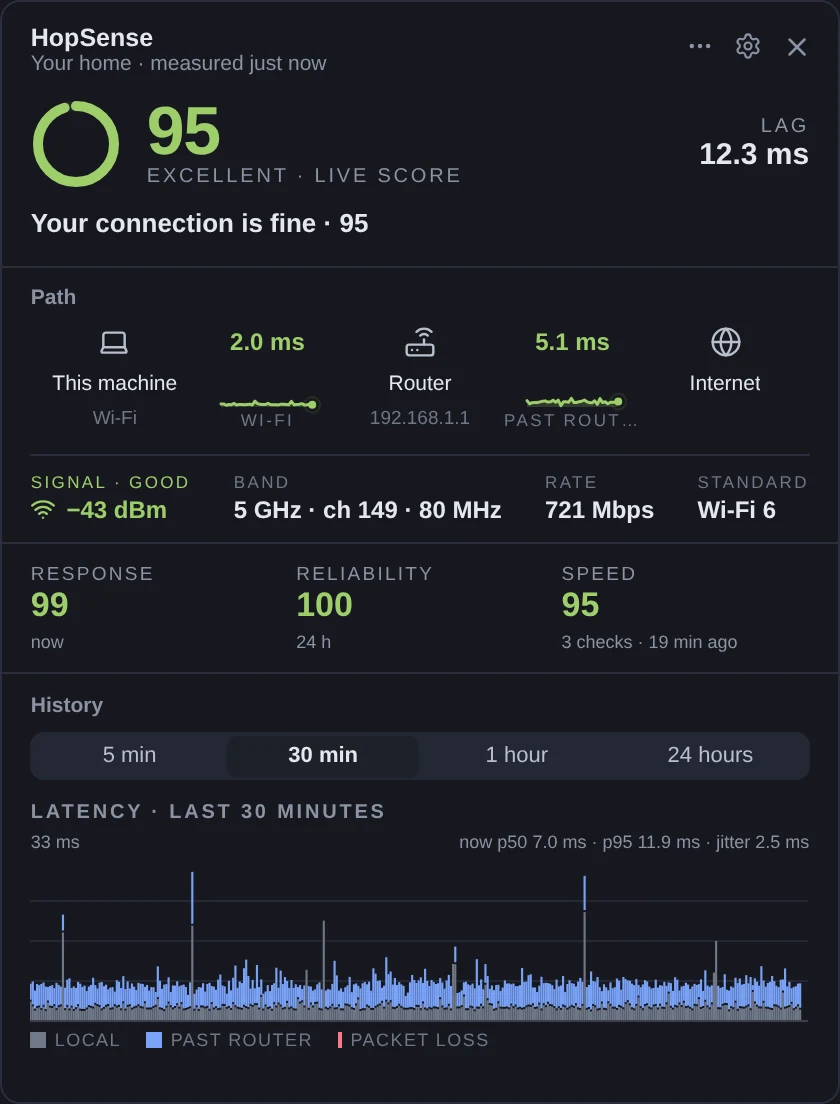
The first hop is your own router. Its answer time, jitter and loss are your home network’s share, including the retries a crowded band costs. Signal, band, width and link rates are read from the adapter itself; the network’s name never is.
- Leg 2
Beyond the router
A public anchor on the internet answers next. What it adds on top of the router is everything past your front door, measured as one figure: the line into your home and the internet behind it. When the evening is slow and the Wi-Fi leg is clean, this is where it went.
Judged together, not one at a time
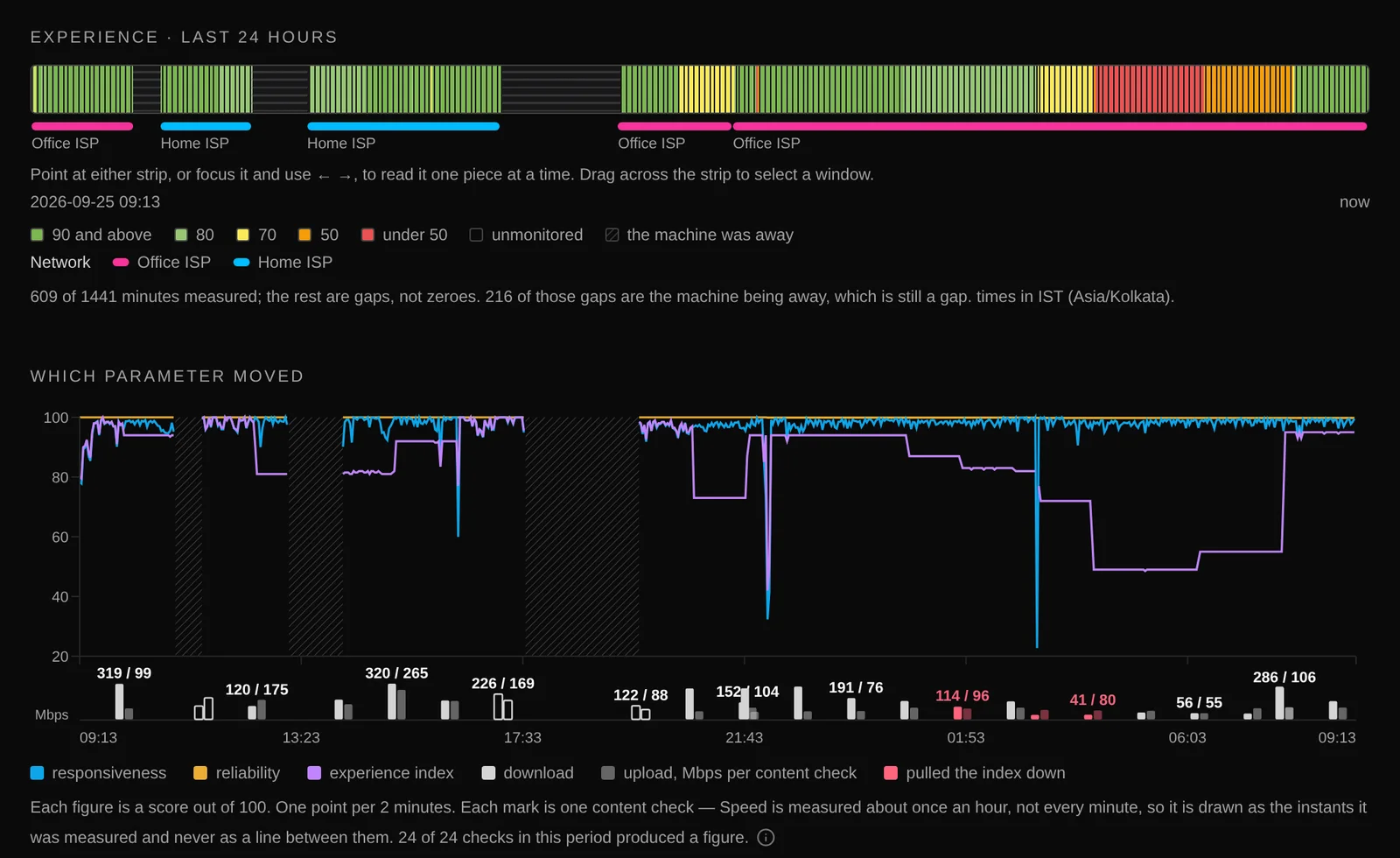
Both legs are probed together with small ICMP and TCP round trips and judged together. A leg is only called down when nothing beyond it answers either. A laptop that went to sleep is recorded as away, never as an outage on anyone's ledger. Outages and interruptions are measured on the stream in seconds, not inferred from a minute's average.
What it costs your connection
The probes are tiny. Once an hour it measures speed with a transfer sized to your line: from about 2 MB down and 3 MB up on a slow connection to at most 32 MB down and 12 MB up on a fast one, never while you are busy using the line, and never on a metered or phone-shared connection. Expect around 200 MB a day on a slow line and up to about 1.1 GB on a fast one, a few percent of one processor core and about 30 MB of memory. Summaries go up once a minute, signed with a key that never leaves your computer.
What you see
A real day, on a real laptop.
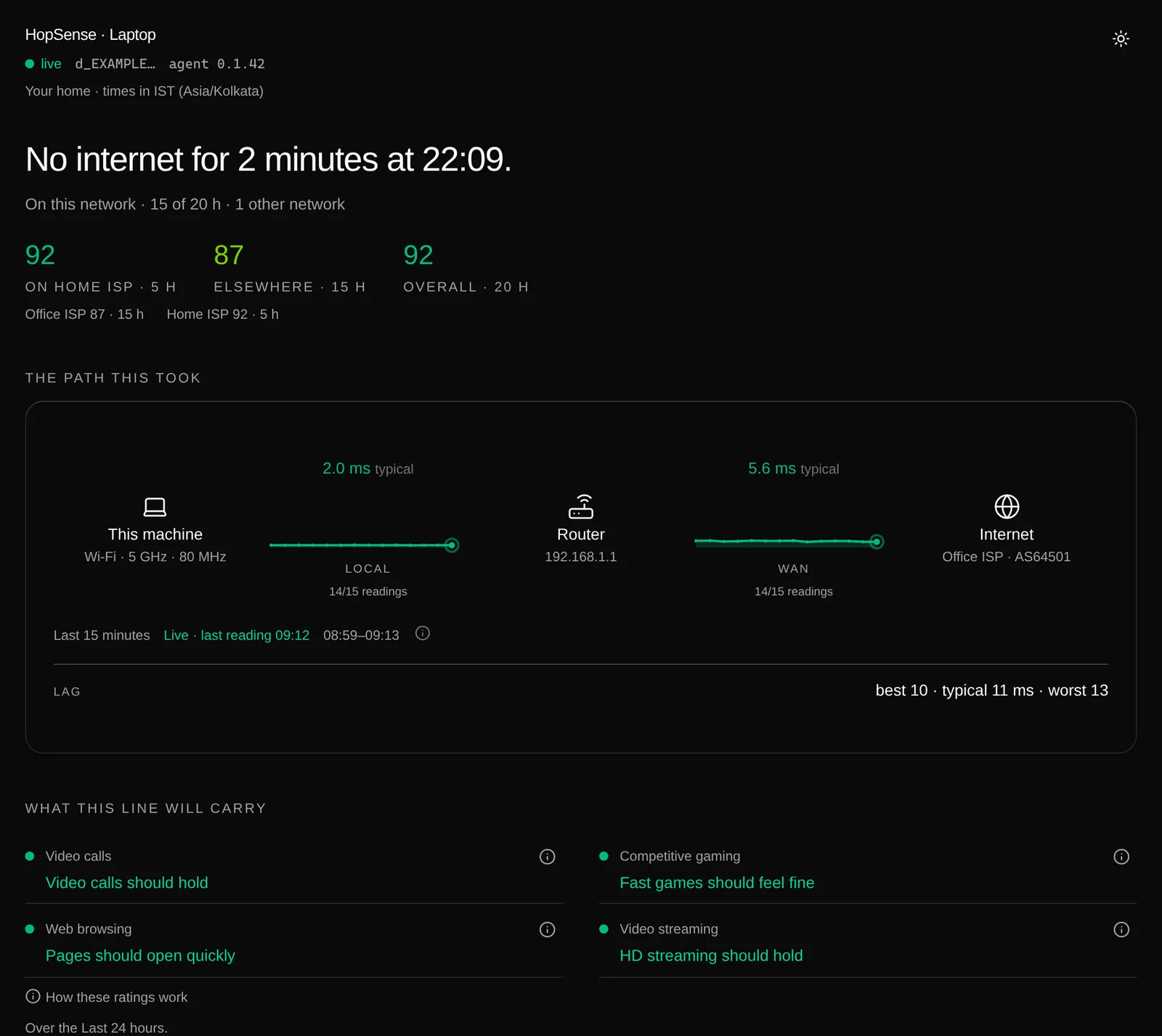
These pictures are one of our own laptops over one day: at home, at the office, asleep in a bag, and a two-minute outage at 22:09. Provider names and addresses are replaced; everything else is what HopSense measured.
What you get
An answer, with the figure it was decided by.
An index is a summary, and HopSense publishes one. Beside it sit the answers people actually want: will the call hold, will the game lag, and whose fault is it.
A score that names its reason
Zero to a hundred, in five bands from excellent to poor. When it drops, a sentence says which of responsiveness, reliability and speed pulled it down, and which leg held the slow tail.
Per-application verdicts
Video calls, competitive gaming, web browsing and video streaming, each judged against published requirements on the minutes that matter to it: busy minutes for a call, quiet ones for a page. Every verdict shows the figure it was decided by.
Your provider, scored on its own
A laptop goes to work and back. The dashboard scores your home provider on the minutes you spent on it, and everywhere else apart: "On your ISP 92 · Elsewhere 87". The other networks never pull your line down, and a new network starts fresh.
Wi-Fi in detail
Signal strength, band, channel width, link rates, retries and frame errors, minute by minute, with roams, band changes and channel changes marked on the chart where they happened.
Events you can point at
Outages and disruptions are measured on the stream in seconds, with a start, an end and a leg. When nobody saw the end, it says so in words instead of inventing a duration.
Recovery after load
How long the line takes to settle after a burst of traffic, the thing people call bufferbloat, stated as a bound observed by a named instrument. Never a figure a coarser instrument happened to print.
Away is not an outage
Lid closed, machine asleep, laptop in a bag: recorded as away, with the reason when the machine could say it, and never charged to your provider as a failure.
Knows what is not your line
A VPN, a phone hotspot, a hotel sign-in page, a firewall on your own computer refusing a probe: each is recognised and said in words, and none of them is ever charged to your provider.
Speed that says why
Once an hour a short check, judged against what your own line usually does. When a check fails, the reason is kept: the test server refused it, it timed out, there was no route. A missing figure says why instead of guessing.
A tray icon and a details window
The tray shows the state at a glance. The details window shows the last five minutes to the last day, with each moment drawn as a bar split into your Wi-Fi and the part past your router, and reads only files on your own computer.
Keeps itself current
On macOS and Linux, new versions install themselves quietly in the background, with no dialog and no restart of anything you are doing. Windows offers the new installer from the tray. Your enrolment, settings and history stay.
Report a problem, on your terms
From the details window: describe it, pick a window of time, read the exact report, then save it or send it. Nothing leaves the machine without that click.
What a bad evening looks like
Not a graph you have to interpret. A sentence you can repeat.
When the score falls, the dashboard names the pillar that moved and the leg that held the slow tail, in the same words every time. The four application verdicts sit above it, each with the number that decided it.
Across the 23 minutes the score fell below good, responsiveness is what pulled it down, and the slow tail was in your Wi-Fi. Reliability and speed held.
- Video callsVideo calls should holdbusy p95 41 ms · loss 0.2 %
- Competitive gamingFast games will feel laggybusy p95 74 ms, against 50
- Web browsingPages should open quicklyquiet p95 38 ms · loss 0.0 %
- Video streamingHD streaming should holddownload 212 Mbit/s
- Wi-Fi
- 6.5 ms
- Beyond the router
- +5.7 ms
How it is built
It would rather say nothing than guess.
Measurement software fails in a particular way: it keeps printing numbers after it has stopped knowing them. These are the rules HopSense is held to, and every one of them cost a real bug to learn.
A number wrong in direction is not a number.
A latency that was really a timer, a loss figure below zero, an outage on a router that was answering all along: each of these has been found and removed, and each is exactly what the checks that gate every change exist to catch. A blank is better than a confident wrong answer.
An end nobody saw is said in words.
If the machine went away while an outage was open, the outage is closed at the last moment anyone was watching, and the page says that the end was not observed. It is never a duration dressed up as a measurement.
A leg is only down if nothing beyond it answers.
The two legs are judged together. A router that stops replying to probes while the internet still arrives through it is noted, not blamed, and a Wi-Fi problem is never written up as an internet one.
One model, held to the same answers.
The scoring began as a port of Nexthop, our open-source Linux reference. The probe on your computer and the service that stores the results score every minute with the same open rules, pinned to identical answers by shared test vectors, so the number you see does not depend on where it was computed.
The probe will be open source under the MIT licence. Its measurement model is the one in Nexthop, our Linux reference implementation, which you can read today.
Your data
It measures the line, not you.
What is sent, once a minute
- Latency, jitter and packet loss per leg, as summaries.
- Wi-Fi signal strength, band, width and link rates. Never the network's name.
- Whether the link was busy, and a short sample of how much data this computer was sending and receiving.
- Outages and interruptions, with their start and duration.
- The hourly speed figure.
- An opaque fingerprint of the network you were on, so a cafe's Wi-Fi is never counted as your home line.
What is never sent
- The name of your Wi-Fi network, or any address or hostname you connect to.
- Which applications you use, what you browse, or anything from your traffic.
- Passwords, keys or the contents of anything on your computer.
Your account is an email address. Uploads are signed by a key that never leaves the computer; there are no passwords and no bearer tokens to leak. Deleting your home deletes its measurements. We never sell data. The details are on the privacy page.
Beta
Early, and honest about it.
HopSense is in beta. It is free while it is, and a home may enrol up to five computers. The software changes quickly, sometimes daily; on macOS and Linux it updates itself quietly, and on Windows the tray offers the new installer. When the dashboard cannot know something, it says so rather than filling the gap. If you find a number that is wrong, we want to hear about it more than anything else.
The service runs in two regions, each with its own database: eu.hopsense.net in the European Union and in.hopsense.net in India. You choose one when you sign up, and your data stays there.
Windows builds are not yet code-signed, so Windows shows a warning on first run. The download page says exactly what to click. A home that needs more than five devices, or an operator who wants HopSense running on their own server for their own subscribers, can write to info@x3me.net.
Questions
Before you install.
Is a slow connection my Wi-Fi or my internet provider?
HopSense answers exactly that. It measures two legs separately, twice a second: from your computer to your own router over Wi-Fi, and from the router to the internet. When something is slow or drops, the dashboard says which leg held the delay, so you know whether to move closer to the router or call your provider.
How is this different from a speed test?
A speed test shows one moment, usually when you are already suspicious, and cannot tell your Wi-Fi from your line. HopSense measures all the time, under the traffic your home actually makes, keeps the two legs apart, and records outages in seconds with a start and an end.
How much data does HopSense use?
The latency probes are tiny. Once an hour a speed check moves about 2 to 32 MB down and 3 to 12 MB up, sized to your line: around 200 MB a day on a slow connection and up to about 1.1 GB on a fast one. It never runs while you are busy using the line, and never on a metered or phone-shared connection.
Will it slow down my internet?
No. The probes are a few small packets a second, and the hourly speed check takes a few seconds and waits until your line is quiet. The program uses a few percent of one processor core and about 30 MB of memory.
What does HopSense send, and what does it never send?
Once a minute it sends summaries: latency, jitter and loss for each leg, Wi-Fi signal and link figures, outages and the hourly speed figure, signed with a key that never leaves your computer. It never sends your Wi-Fi network name, the sites or addresses you visit, which applications you use, anything from your traffic, or your location. We never sell data.
Where is my data stored?
In the region you choose when you sign up, and only there. The European service, eu.hopsense.net, stores its data in the European Union; in.hopsense.net stores its data in India. Sign-up suggests the region for the country you are in and lets you pick the other. A home cannot be moved between regions.
Is HopSense free?
Yes, during the beta. A home can measure up to five computers at no cost, with no card and no password: sign-up is an email address and a link. A home that needs more devices can write to us.
Which computers does it run on?
Windows 10 and 11 (64-bit), macOS 12 or later on Apple Silicon and Intel Macs, and Linux (x86_64 and 64-bit ARM). None of them needs administrator rights to install. Phones are not supported yet.
What if my laptop sleeps, I use a VPN, or I connect through my phone?
A laptop that is asleep or closed is recorded as away, never as an outage. A VPN, a phone hotspot or a hotel sign-in page is recognised and said in words, and none of them is ever counted against your home provider. A laptop that goes to the office has its home provider scored apart from every other network.
Does it keep itself up to date?
On macOS and Linux new versions install themselves quietly in the background. On Windows the tray offers the new installer. Your enrolment, settings and history are kept either way.
Get started
Four steps, no terminal.
- 1
Create your home
Choose where your data lives, Europe or India, then enter an email address and follow the sign-in link it sends. There is no password to invent and nothing to pay.
- 2
Name a device
Add the computer you want to measure. The dashboard gives you a setup link that ties that computer to your home.
- 3
Download and install
Windows, macOS or Linux. The installer needs no administrator rights and asks for the setup link.
- 4
Paste the link
Within a couple of minutes the first minute of measurements arrives and the tray icon turns green. Repeat for up to five computers.
On Linux or a Mac, one line in a terminal does it all:
curl -fsSL https://hopsense.net/install.sh | sh